
 All Case StudiesConstructionManufacturingEquipment DealersTrade Show
Video Production Equipment: The Definitive Checklist for 2026
Reviewed and updated for 2026.
Most gear guides are written for people shooting in a controlled room. This one is written for people shooting where the work happens — an active jobsite, a running plant floor, a show floor, a dealer yard in February.
The environment changes what matters. On a site, the best camera is the one you can carry in one trip and still hear the interview over a generator. Here is the honest checklist, category by category, plus the things most buyers get backwards.
The thing everyone gets backwards
People overspend on cameras and underspend on audio and lighting.
An audience will forgive a soft image. It will not sit through bad sound. If your budget is finite, buy the microphone and the light before you buy the next camera body — the return is not close.
The second thing people get backwards is resolution. Sensor resolution stopped being the differentiator years ago. What separates a good image now is dynamic range, low-light behavior, rolling shutter performance, and how much the camera compresses the file before it hits the card. A machine moving across a frame under mixed shop lighting will expose all four.
Cameras
The three tiers
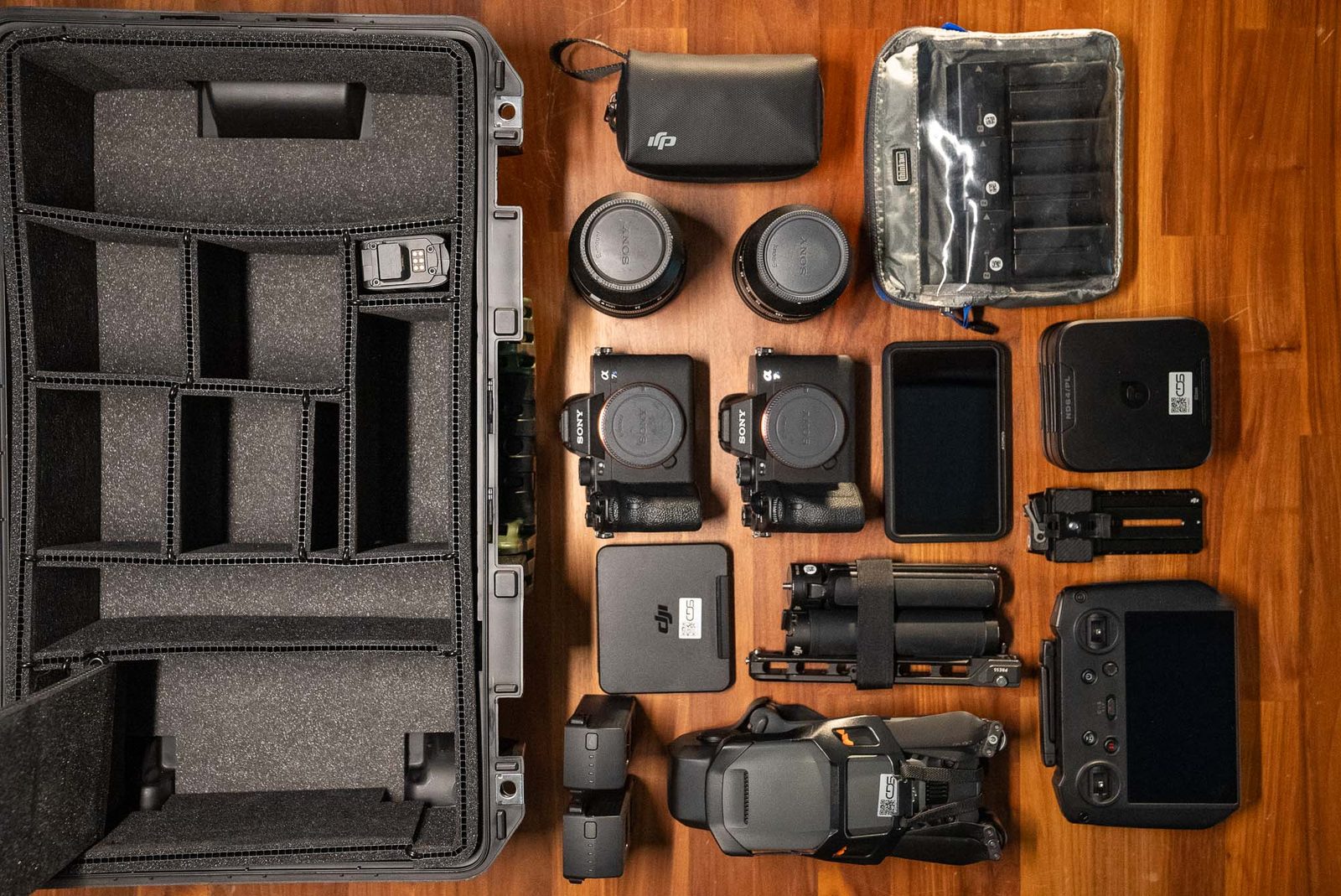
- Full-frame and APS-C mirrorless — the workhorse for industrial video. Modern bodies record 10-bit log internally, handle low light well, and are small enough to work in a cab or a tight equipment bay.
- Cinema cameras — better dynamic range, built-in ND, proper timecode and audio inputs, and bodies designed to be rigged. Worth it when the footage has to hold up in a graded, multi-camera edit.
- Action and pocket cameras — not a main camera, but genuinely useful as a second angle where you cannot put a person: on a machine, in a chute, on a hard hat.
What to actually look at when choosing
- Dynamic range — the difference between holding detail in a dark cab and blowing out the sky behind it
- Internal 10-bit recording and a decent codec, so color and green screen keys survive the edit
- Rolling shutter — bad rolling shutter turns a passing machine or a rotating drum into jelly
- Dual base ISO, which is what makes a dim shop bay workable
- Weather sealing, because you will shoot in rain and dust and both will happen without warning
- Battery life and card type — CFexpress is fast and hot, SD is slower and cheap, and running out of either ends the day
Buy two bodies before you buy one better one. A second camera gets you a safety angle on a demo that only runs once, and a backup when something fails at ten in the morning.
Lenses
Glass changes the look more than the body does, and it holds its value far longer.
- A fast standard zoom — the lens that stays on the camera most of the day. Covers interviews, walkarounds, and general coverage.
- A wide zoom or a wide prime — for cab interiors, tight equipment bays, and making a shop floor feel like a shop floor.
- A long telephoto zoom — the most underrated lens in industrial work. It lets you shoot a machine in operation from a safe standoff distance and it compresses a jobsite into something that looks impressive.
- One or two fast primes — for interviews where you want the background to fall away, and for anything shot in genuinely bad light.
Image stabilization matters more here than on a controlled set, because you are often handheld, on uneven ground, in a hurry.
Lighting
On location, portability beats output. A light that takes twenty minutes to set up will not get used on a site where you have forty minutes total.
- Battery-powered COB lights with a bowens-style mount — one light and a softbox covers most interviews
- Bi-color LED panels — fast, flat, and good for filling a face without a stand-and-softbox ritual
- Small RGB tube lights — for adding separation or a brand color behind a subject in a dull room
- A collapsible reflector, which weighs nothing and fixes half your outdoor interviews
- Sandbags. Wind on an open site will put an unweighted stand through a windshield.
Two practical notes for industrial locations. First, the ambient light in most plants is a mix of sodium, fluorescent, and daylight through a roll-up door, all at different color temperatures — bring lights you can dial to match, and set white balance manually. Second, check whether the facility requires intrinsically safe equipment before you plug anything in.
Audio
This is the category where the last few years actually changed something.
Recorders and wireless systems that capture 32-bit float have made clipped audio close to a solved problem. You can set a level, have a superintendent shout over a passing loader, and still recover a usable track. On a loud site with one take and no time, that is worth more than any camera upgrade.
- Digital wireless lavalier system — the default for interviews on a site. Two channels minimum.
- Shotgun microphone — for natural sound, machine sound, and anything you cannot mic directly.
- A field recorder — for backup, for multi-mic setups, and because camera audio inputs are usually the weakest link.
- Wind protection. A furry windscreen on everything that goes outside, and a spare, because they get lost.
- Closed-back headphones. Monitoring on set is not optional; you cannot fix what you did not hear.
Record ambient sound of the machines separately for a minute or two at every location. Editors will use it on every cut, and it is free while you are standing there.
Support and stabilization
- A fluid-head tripod. Not a photo tripod — the head is what makes a pan look intentional.
- A gimbal, for walking shots alongside a machine or through a plant. Gimbals have largely replaced the mechanical stabilizer rigs of a decade ago for this kind of work.
- A monopod, for shows and any situation where a tripod's footprint is a hazard or a nuisance.
- A slider or a small dolly, if you shoot a lot of product detail. Optional on site, valuable on a bench.
On a jobsite, the tripod that gets used is the one that goes up in thirty seconds and does not tip. Carbon fiber is worth the money when you are carrying it a quarter mile.
Drones
Aerials are close to standard for construction and site work now, and the rules have tightened.
Before anyone flies commercially in the United States, they need an FAA Part 107 remote pilot certificate. The aircraft needs to be registered and to broadcast Remote ID, which has been required since 2023. Controlled airspace requires authorization, which for most sites is handled through LAANC in a few minutes — but it has to be handled.
Anyone who cannot answer those questions clearly should not be flying over your project.
On the hardware side, a current folding prosumer drone with a one-inch or larger sensor and a mechanical gimbal covers most jobsite and marketing work. Larger platforms with interchangeable lenses are worth it when the aerial has to intercut with ground footage in a graded piece.
Safety still governs. Do not fly over people who have not been briefed, keep clear of cranes and lift equipment, and confirm the site's own drone policy before launch — many general contractors and plants have one.
The jobsite kit most guides leave out
None of this shows up in gear reviews and all of it decides whether the day works.
- PPE for every person on the crew — hard hat, hi-vis vest, safety glasses, steel or composite toe boots, and hearing protection
- Gloves that let you still operate a camera
- A rain cover for the camera and a dry bag for everything else
- Lens cloths and a blower. Dust and concrete slurry find glass immediately.
- Power — spare batteries for everything, plus a portable power station if there is no outlet within a hundred yards
- Gaffer tape, zip ties, and a multi-tool
- A hard case that survives being thrown in a truck bed
- Two copies of every card offloaded before anyone leaves the site
That last one is not gear, it is a habit, and it is the difference between a delay and a disaster.
Media and data
High-bitrate recording eats cards. Buy fast cards rated for your camera's highest mode, buy more of them than you think you need, and label them.
For offload, portable SSDs are fast and durable enough for the field. Back up to a second drive before the cards get formatted — always, every time, no exceptions. Long-term, keep the finished work and the selects somewhere you can find them in three years, because you will be asked to re-cut them.
Post-production software
The field has consolidated. Three editors do essentially all professional work now:
- Adobe Premiere Pro — the most common in agency and corporate workflows, strong integration with After Effects for motion graphics
- DaVinci Resolve — editing, color, and audio in one application, with the color tools still the best in the business. There is a capable free version.
- Final Cut Pro — fast on Apple hardware and popular with small teams and solo editors
Two notes for anyone working from an older guide: Adobe SpeedGrade was discontinued years ago and its role moved into Premiere's Lumetri color tools, and Final Cut Pro X is now just Final Cut Pro.
For audio post, Adobe Audition and Avid Pro Tools remain the standards, and a dedicated repair tool such as iZotope RX is worth having for the day a generator ruins an otherwise perfect interview.
Where a component is buried inside a housing, 3D and animation earn their place. If your engineering team already has CAD models, those can be brought into an animation package and used for cutaways that show a flow path or a drive train — something no camera can capture without destroying a machine.
Live streaming and events
If you stream open houses, dealer events, or product launches, the kit is mostly the same with three additions: a camera with clean HDMI or SDI output, a hardware switcher or encoder, and a genuinely reliable internet connection.
The connection is the part that fails. Use hardwired ethernet where it exists, and carry a bonded cellular option as backup — venue wifi will not hold a stream when three thousand people are on it.
How to build a kit without wasting money
In order:
- Audio first — a wireless lav system and a recorder
- One good light you can run on battery
- One camera body and one fast zoom
- A fluid-head tripod
- A second body, then a second lens
- A gimbal, once you know you actually need moving shots
- A drone, once someone on the team is certificated to fly it legally
Rent anything you will use less than a few times a year. Long telephotos, specialty lenses, large lighting packages, and high-end cinema bodies are all cheaper to rent than to own and store.
The short version
Gear does not make a video good. But the wrong gear on a jobsite will absolutely make one impossible, and the wrong gear is usually the missing microphone, not the older camera.
Buy for the environment you actually shoot in. Weight, battery life, weather sealing, and audio in noise matter more than a spec sheet, and they are what you will be grateful for at four in the afternoon on a site that has run two hours behind all day.
Videographer vs. Video Production Company: What's the Difference?
The Art of Writing Video Scripts: Tips for Captivating Content
Best Marketing Video of 2024 — and Contractor of the Year the following year.

Fort Mill, SC 29708